> ## Documentation Index
> Fetch the complete documentation index at: https://docs.clearline.me/llms.txt
> Use this file to discover all available pages before exploring further.
# Manual Flow in POS System Checkout
> Implement manual widget interaction flow in your POS checkout process
## Overview
After obtaining an access token, your POS system can interact with the Widgets platform through a sequence of API calls. This flow allows you to retrieve available widgets, initiate a widget session, and display the resulting QR code on the customer-facing screen (CFS) or deliver it via other supported methods (e.g., email or SMS).
***
## Manual Flow Steps
Merchant adds products to the shopping cart.
Merchant proceeds to the checkout process.
During checkout, the POS system completes several checks:
* Check if post-purchase transactions are enabled
* Check if POS Rules are enabled
If POS Rules are disabled, a confirmation modal is shown proposing to use ClearLine Marketing apps.
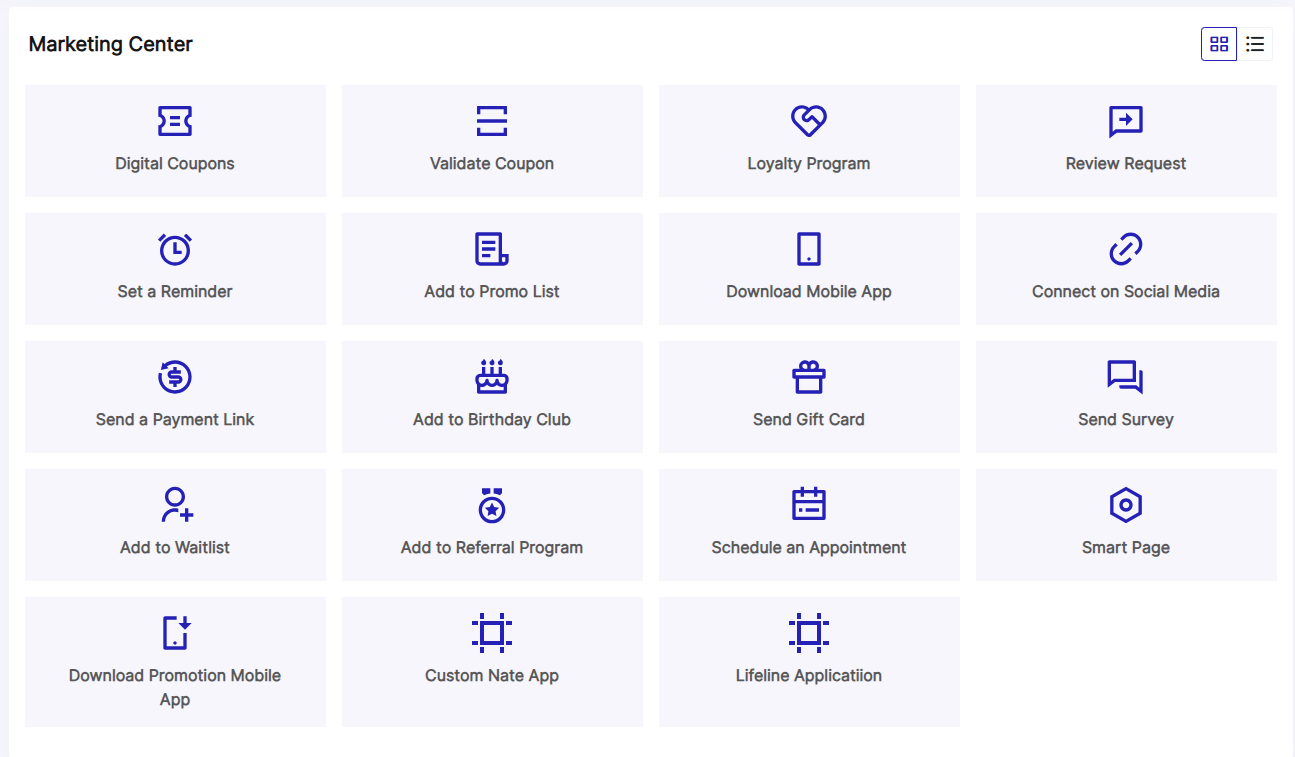
If merchant confirms to proceed with ClearLine Marketing, a modal is shown with the marketing apps list (tiles view).
**Endpoint:** Get Available Widgets (Marketing Apps)
Merchant clicks on one of the marketing apps.
**Endpoint:** Start a Widget Session (Display QR Code preview)
Merchant clicks the "Open QR Code" button or "Send" button.
**Endpoint:** Complete the Widget Session
ClearLine app shows the QR Code template (modal) or sends SMS/email to the customer.
***
## Get Available Widgets (Marketing Apps)
Retrieve a list of widgets available for a specific POS location. These widgets can be used to engage customers through various delivery methods like QR codes, emails, or SMS.
```bash Request theme={null}
POST https://public-api-test.clearline.me/v2/pos/{posSystem}/widgets/list
```
```json Request Body theme={null}
{
"posLocationId": "string"
}
```
```json Response theme={null}
{
"data": [
{
"id": 1,
"name": "Digital Coupons",
"icon": "https://web.clearline.me/widget/IssueCoupon/icon",
"description": "How It Works\\nWhen you decide that your business...",
"deliveryMethods": ["Sms", "Email", "QrCode"],
"flow": ["Default", "Custom"]
}
]
}
```
### Headers
| Name | Value | Description |
| ------------- | -------------------- | ---------------------------- |
| Authorization | Bearer access\_token | Request authorization header |
| Content-Type | application/json | Content type |
### Path Parameters
| Field name | Description |
| ---------- | ---------------------------------------------------- |
| posSystem | The identifier of the POS system (e.g., pax, clover) |
### Request Body
| Field name | Type | Description |
| ------------- | ------ | ---------------------------------- |
| posLocationId | string | The identifier of the POS location |
### Response Fields
Array of available widget objects
Identifier of the marketing app
Name of the marketing app
Icon in SVG format
Description of the marketing app
Allowed delivery methods (Sms, Email, QrCode)
Identifies the flow of the widget execution (Default, Custom)
### UI Example
 ***
## Start a Widget Session
Initiate a widget session and preview the QR code.
```bash Request theme={null}
POST https://public-api-test.clearline.me/v2/pos/{posSystemId}/widget/start
```
```json Request Body theme={null}
{
"posLocationId": "{posLocationId}",
"widgetId": "{widgetId}",
"terminalId": "{terminalId}",
"couponId": "{couponId}"
}
```
```json Response theme={null}
{
"data": {
"sessionId": "string",
"qrCodePreviewHtmlLinkUrl": "string"
}
}
```
### Headers
| Name | Value | Description |
| ------------- | -------------------- | ---------------------------- |
| Authorization | Bearer access\_token | Request authorization header |
| Content-Type | application/json | Content type |
### Path Parameters
| Field name | Type | Description |
| ----------- | ------ | ---------------------------------------------------- |
| posSystemId | string | The identifier of the POS system (e.g., pax, clover) |
### Request Body
| Field name | Type | Required | Description |
| ------------- | ------- | -------- | ------------------------------------------------------------------- |
| posLocationId | string | Yes | The identifier of the POS location |
| widgetId | integer | Yes | The identifier of the widget |
| terminalId | string | Yes | The identifier of the POS terminal |
| couponId | string | No | The identifier of the coupon, required for Issue Coupon widget only |
### Response Fields
Widget session data
Session identifier for tracking the widget interaction
Preview QR code HTML link URL
***
## Show Widget QR Code
Display the widget QR code to the customer on the customer-facing screen.
```bash Request theme={null}
POST https://public-api-test.clearline.me/v2/pos/{posSystemId}/widget/showQrCode
```
```json Request Body theme={null}
{
"widgetId": 0,
"sessionId": "string",
"posLocationId": "string",
"terminalId": "string",
"profile": {
"firstName": "string",
"lastName": "string",
"customerEmail": "string",
"customerPhone": "string",
"salesPerson": "string"
},
"couponId": "string"
}
```
```json Response theme={null}
{
"data": {
"qrCodeHtmlLinkUrl": "string"
}
}
```
### Headers
| Name | Value | Description |
| ------------- | -------------------- | ---------------------------- |
| Authorization | Bearer access\_token | Request authorization header |
| Content-Type | application/json | Content type |
### Path Parameters
| Field name | Type | Description |
| ----------- | ------ | ---------------------------------------------------- |
| posSystemId | string | The identifier of the POS system (e.g., pax, clover) |
### Request Body
| Field name | Type | Required | Description |
| ------------- | ------- | -------- | ------------------------------------------------------------------- |
| widgetId | integer | Yes | The identifier of the widget |
| sessionId | string | Yes | The session identifier from the start widget call |
| posLocationId | string | Yes | ID of the location where the transaction was made |
| terminalId | string | Yes | The identifier of the POS terminal |
| profile | object | No | Customer profile information |
| couponId | string | No | The identifier of the coupon, required for Issue Coupon widget only |
### Profile Object
| Field name | Type | Description |
| ------------- | ------ | ------------------------ |
| firstName | string | Customer's first name |
| lastName | string | Customer's last name |
| customerEmail | string | Customer's email address |
| customerPhone | string | Customer's phone number |
| salesPerson | string | Name of the sales person |
### Response Fields
QR code display data
QR code HTML link URL to display on the customer-facing screen
***
## Send Widget QR via Email or SMS
Send the widget QR code to the customer via email or SMS instead of displaying it on the customer-facing screen.
```bash Request theme={null}
POST https://public-api-test.clearline.me/v2/pos/{posSystemId}/widget/sendMessage
```
```json Request Body theme={null}
{
"widgetId": 0,
"sessionId": "string",
"posLocationId": "string",
"terminalId": "string",
"profile": {
"firstName": "string",
"lastName": "string",
"customerEmail": "string",
"customerPhone": "string",
"salesPerson": "string"
},
"couponId": "string"
}
```
```json Response theme={null}
{
"data": {}
}
```
### Headers
| Name | Value | Description |
| ------------- | -------------------- | ---------------------------- |
| Authorization | Bearer access\_token | Request authorization header |
| Content-Type | application/json | Content type |
### Path Parameters
| Field name | Type | Description |
| ----------- | ------ | ---------------------------------------------------- |
| posSystemId | string | The identifier of the POS system (e.g., pax, clover) |
### Request Body
| Field name | Type | Required | Description |
| ------------- | ------- | -------- | ------------------------------------------------------------------- |
| widgetId | integer | Yes | The identifier of the widget |
| sessionId | string | Yes | The session identifier from the start widget call |
| posLocationId | string | Yes | ID of the location where the transaction was made |
| terminalId | string | Yes | The identifier of the POS terminal |
| profile | object | Yes | Customer profile information (required for delivery) |
| couponId | string | No | The identifier of the coupon, required for Issue Coupon widget only |
### Profile Object
| Field name | Type | Required | Description |
| ------------- | ------ | -------- | ------------------------ |
| firstName | string | No | Customer's first name |
| lastName | string | No | Customer's last name |
| customerEmail | string | No | Customer's email address |
| customerPhone | string | No | Customer's phone number |
| salesPerson | string | No | Name of the sales person |
At least one of `customerEmail` or `customerPhone` must be provided to send the message.
### Response Fields
Empty object returned on successful message delivery
***
## Next Steps
View the complete checkout integration workflow
Explore all widget endpoints
Learn how to authenticate API requests
Configure manual vs automated flow
***
## Start a Widget Session
Initiate a widget session and preview the QR code.
```bash Request theme={null}
POST https://public-api-test.clearline.me/v2/pos/{posSystemId}/widget/start
```
```json Request Body theme={null}
{
"posLocationId": "{posLocationId}",
"widgetId": "{widgetId}",
"terminalId": "{terminalId}",
"couponId": "{couponId}"
}
```
```json Response theme={null}
{
"data": {
"sessionId": "string",
"qrCodePreviewHtmlLinkUrl": "string"
}
}
```
### Headers
| Name | Value | Description |
| ------------- | -------------------- | ---------------------------- |
| Authorization | Bearer access\_token | Request authorization header |
| Content-Type | application/json | Content type |
### Path Parameters
| Field name | Type | Description |
| ----------- | ------ | ---------------------------------------------------- |
| posSystemId | string | The identifier of the POS system (e.g., pax, clover) |
### Request Body
| Field name | Type | Required | Description |
| ------------- | ------- | -------- | ------------------------------------------------------------------- |
| posLocationId | string | Yes | The identifier of the POS location |
| widgetId | integer | Yes | The identifier of the widget |
| terminalId | string | Yes | The identifier of the POS terminal |
| couponId | string | No | The identifier of the coupon, required for Issue Coupon widget only |
### Response Fields
Widget session data
Session identifier for tracking the widget interaction
Preview QR code HTML link URL
***
## Show Widget QR Code
Display the widget QR code to the customer on the customer-facing screen.
```bash Request theme={null}
POST https://public-api-test.clearline.me/v2/pos/{posSystemId}/widget/showQrCode
```
```json Request Body theme={null}
{
"widgetId": 0,
"sessionId": "string",
"posLocationId": "string",
"terminalId": "string",
"profile": {
"firstName": "string",
"lastName": "string",
"customerEmail": "string",
"customerPhone": "string",
"salesPerson": "string"
},
"couponId": "string"
}
```
```json Response theme={null}
{
"data": {
"qrCodeHtmlLinkUrl": "string"
}
}
```
### Headers
| Name | Value | Description |
| ------------- | -------------------- | ---------------------------- |
| Authorization | Bearer access\_token | Request authorization header |
| Content-Type | application/json | Content type |
### Path Parameters
| Field name | Type | Description |
| ----------- | ------ | ---------------------------------------------------- |
| posSystemId | string | The identifier of the POS system (e.g., pax, clover) |
### Request Body
| Field name | Type | Required | Description |
| ------------- | ------- | -------- | ------------------------------------------------------------------- |
| widgetId | integer | Yes | The identifier of the widget |
| sessionId | string | Yes | The session identifier from the start widget call |
| posLocationId | string | Yes | ID of the location where the transaction was made |
| terminalId | string | Yes | The identifier of the POS terminal |
| profile | object | No | Customer profile information |
| couponId | string | No | The identifier of the coupon, required for Issue Coupon widget only |
### Profile Object
| Field name | Type | Description |
| ------------- | ------ | ------------------------ |
| firstName | string | Customer's first name |
| lastName | string | Customer's last name |
| customerEmail | string | Customer's email address |
| customerPhone | string | Customer's phone number |
| salesPerson | string | Name of the sales person |
### Response Fields
QR code display data
QR code HTML link URL to display on the customer-facing screen
***
## Send Widget QR via Email or SMS
Send the widget QR code to the customer via email or SMS instead of displaying it on the customer-facing screen.
```bash Request theme={null}
POST https://public-api-test.clearline.me/v2/pos/{posSystemId}/widget/sendMessage
```
```json Request Body theme={null}
{
"widgetId": 0,
"sessionId": "string",
"posLocationId": "string",
"terminalId": "string",
"profile": {
"firstName": "string",
"lastName": "string",
"customerEmail": "string",
"customerPhone": "string",
"salesPerson": "string"
},
"couponId": "string"
}
```
```json Response theme={null}
{
"data": {}
}
```
### Headers
| Name | Value | Description |
| ------------- | -------------------- | ---------------------------- |
| Authorization | Bearer access\_token | Request authorization header |
| Content-Type | application/json | Content type |
### Path Parameters
| Field name | Type | Description |
| ----------- | ------ | ---------------------------------------------------- |
| posSystemId | string | The identifier of the POS system (e.g., pax, clover) |
### Request Body
| Field name | Type | Required | Description |
| ------------- | ------- | -------- | ------------------------------------------------------------------- |
| widgetId | integer | Yes | The identifier of the widget |
| sessionId | string | Yes | The session identifier from the start widget call |
| posLocationId | string | Yes | ID of the location where the transaction was made |
| terminalId | string | Yes | The identifier of the POS terminal |
| profile | object | Yes | Customer profile information (required for delivery) |
| couponId | string | No | The identifier of the coupon, required for Issue Coupon widget only |
### Profile Object
| Field name | Type | Required | Description |
| ------------- | ------ | -------- | ------------------------ |
| firstName | string | No | Customer's first name |
| lastName | string | No | Customer's last name |
| customerEmail | string | No | Customer's email address |
| customerPhone | string | No | Customer's phone number |
| salesPerson | string | No | Name of the sales person |
At least one of `customerEmail` or `customerPhone` must be provided to send the message.
### Response Fields
Empty object returned on successful message delivery
***
## Next Steps
View the complete checkout integration workflow
Explore all widget endpoints
Learn how to authenticate API requests
Configure manual vs automated flow